FilterOrbit
Help customers find products faster
Powerful WooCommerce product filtering with instant client-side filtering, advanced filters and AI-powered product discovery.
- WordPress 6.0 or later
- PHP 7.4 or later
- WooCommerce active

Features
What you get with FilterOrbit
Zero-request filtering
Filters run in the browser on a cached product list — no page reloads and no AJAX round trips.
AI natural-language search
Shoppers type “blue shirts under $30” and the matching filters apply. Works with OpenAI or Gemini, with a keyword fallback.
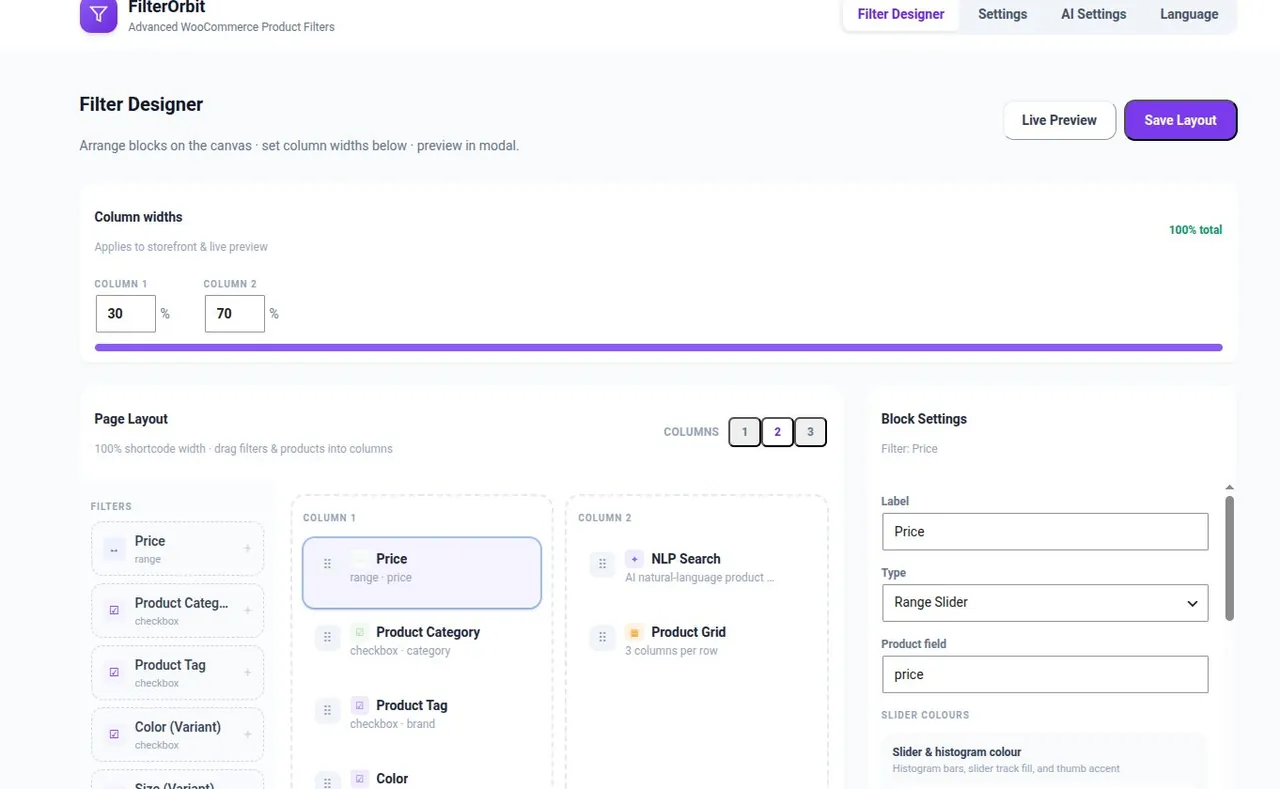
Drag-and-drop designer
Build the filter sidebar in the admin. The layout you save is exactly what shoppers see.
Price histogram & swatches
A price slider with distribution bars and image swatch grids for colour and style.
Every WooCommerce attribute
Categories, tags, price and every global or custom attribute, including variations like size and colour.
Theme-safe styling
Scoped, prefixed CSS with per-filter colour controls. Works with block and classic themes.
Screenshots
See it in action

Who it’s for
Why teams choose FilterOrbit
FilterOrbit gives shoppers a smooth way to narrow products on your store. Reduce bounce rates and help customers find what they need faster with instant, client-side filtering designed for WooCommerce.
Fashion & apparel stores
Let shoppers narrow by size, colour and price in a single tap, without waiting for reloads.
Small & medium catalogs
Up to 100 products are preloaded, so filtering feels instant on every device.
Stores that want AI search
Add plain-English product search with your own OpenAI or Gemini key — Gemini’s free tier covers most small stores.
Get started
Up and running in three steps
-
1
Install with WooCommerce
Install FilterOrbit from Plugins → Add New on a site with WooCommerce active.
-
2
Design your filters
Arrange categories, price, attributes and swatches in FilterOrbit → Filter Designer.
-
3
Add the shortcode
Place [filter_orbit] on your shop page. Optionally connect an AI provider for natural-language search.
FAQ
Common questions
Does filtering use AJAX calls?
No. Product data is loaded with the page and filtering runs entirely in the browser. The only network request is the optional AI search, and only when you configure a provider.
Is the AI search free?
The feature is free in the plugin. You pay your AI provider directly for usage, and Google Gemini’s free tier is enough for most small stores.
Will it work with my theme?
Yes. FilterOrbit renders in its own scoped container with prefixed CSS classes, so it does not clash with block or classic themes.
How many products can it handle?
It preloads up to 100 published products so filtering is instant. It is designed for small and medium catalogs.
More free plugins from Plugin Pros
Ready to try FilterOrbit?
Free forever. Install it from WordPress.org or reach out if you have questions.