
Why Live Chat Plugins Slow Down WordPress (and How WebSockets Fix It)
Lukas Becker

Introduction
Live chat helps you close sales and answer questions while visitors are still on your site. But many WordPress site owners add a chat plugin and then notice slower load times, CPU spikes in their hosting dashboard, or warnings from their host about resource limits. Often the cause isn’t the chat itself. It’s how the chat checks for new messages, and that’s exactly the problem a WordPress live chat WebSocket connection solves.
Why AJAX live chat plugins put a heavy load on WordPress
Many WordPress live chat plugins use AJAX polling. The chat widget asks the server, “any new messages?” every few seconds, usually through admin-ajax.php or the REST API. It does this for every open tab, even when nobody is typing.
Each of those requests is not a small one. WordPress loads core, every active plugin, your theme, and a database connection, and it ties up a PHP worker until it finishes. The answer is usually “no new messages”, but the server still did all that work.
Now multiply it. As a simple example: 50 visitors with the chat open, polling every 3 seconds, is about 1,000 requests a minute. That’s 1,000 full WordPress boots that did nothing useful. On shared hosting, that can use up your PHP workers, memory and CPU limits, and real visitors end up waiting.
Page caching doesn’t help here. Requests to admin-ajax.php and most REST calls skip the page cache, so every poll goes all the way to PHP and the database. Your cached homepage can be fast while the chat keeps the server busy in the background.
The WordPress Heartbeat API works the same way, sending regular AJAX requests from open admin screens. A chat plugin that polls adds more of the same traffic on top.
There’s also a trade-off you can’t escape with polling. Poll every 2 seconds and messages feel live but the server load goes up. Poll every 15 seconds and the load drops, but replies feel slow and visitors leave. Polling makes you choose between speed and server health.
How a WordPress live chat WebSocket fixes it
A WebSocket is a single connection that stays open between the visitor’s browser and the chat server. Instead of the browser asking again and again, the server pushes a message the moment one arrives.
- One connection per visitor instead of a request every few seconds
- Messages arrive right away, with no polling interval to tune
- No repeated WordPress boots just to check for new messages
The key is to run the real-time layer outside WordPress and PHP. WordPress keeps doing what it does well, serving your pages, while a separate service holds the open connections and delivers the messages.
How we solved it in Live Chat by Plugin Pros
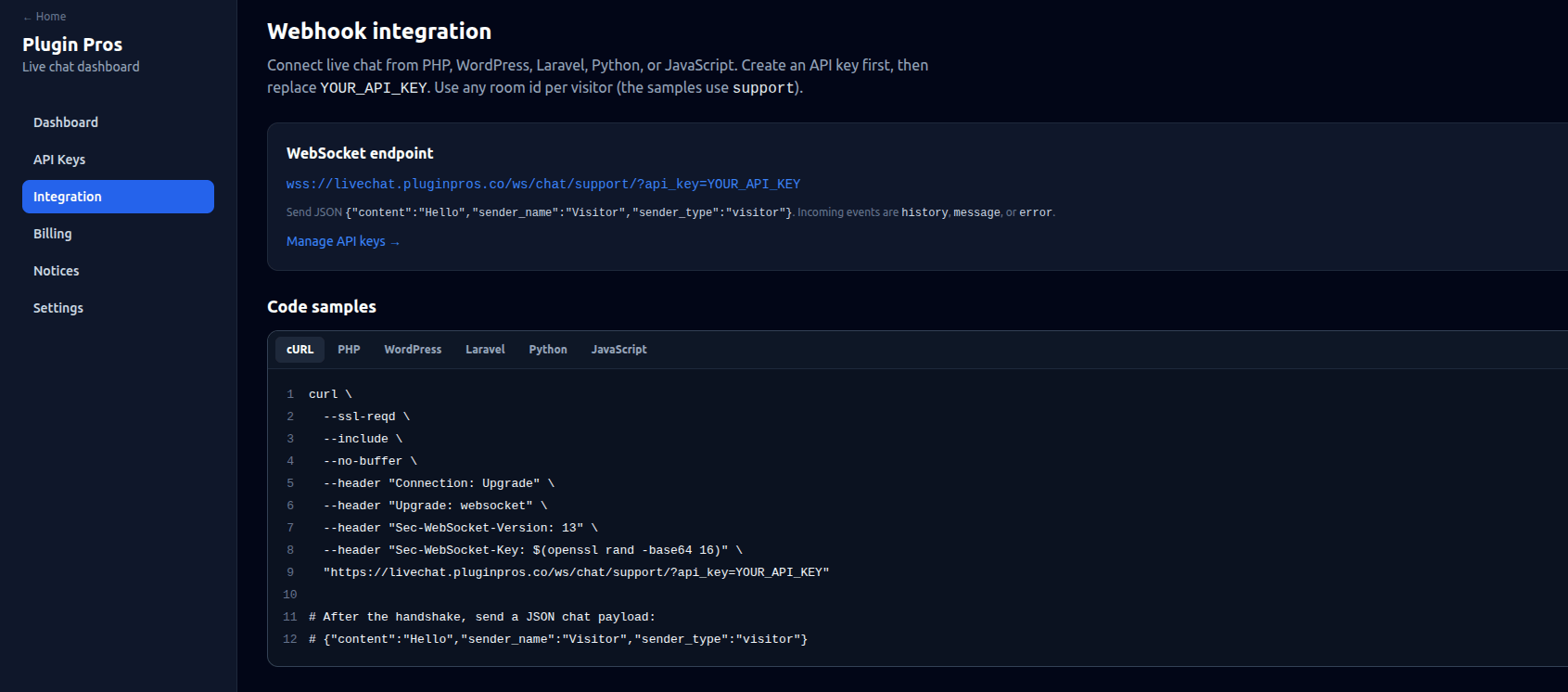
That’s how we built Live Chat by Plugin Pros. The chat runs on its own WebSocket service, not inside your WordPress PHP processes. Your widget connects to the WebSocket endpoint with an API key, and each visitor gets their own room. Messages are sent as JSON, and the server pushes new events straight to the open connection.
Your WordPress site doesn’t have to answer “any new messages?” thousands of times an hour. The Integration page in your dashboard has copy-ready samples for WordPress, PHP, Laravel, Python, and JavaScript so that you can connect it to any site, not just WordPress.
Why choose Live Chat by Plugin Pros
- Pay per conversation, not per agent. Every plan, including the free one, has unlimited agents. Add your whole team at no extra cost.
- A real free plan. 100 conversations a month, no card needed. It stops at 100, so you never get a surprise bill.
- Simple paid plans. $7/month for 1,000 conversations, $15 for 5,000 and $29 for 20,000.
- Fair overage. $2 per extra 1,000 conversations ($1.50 on Business).
- Fast by design. WebSocket messaging that keeps chat traffic off your WordPress server.
Want live chat that doesn’t slow your site down? Start free at livechat.pluginpros.co.